Minimalistic Text (donate) v2.11.7.4 Apk


Requirements: Android v2.1+
Overview: Minimalistic Text is a widget app that displays information in a minimalistic way.
 It can be configured to display time, date, battery and weather information. The layout of the widget is highly customizable through the layout editor.

 Minimalistic Text is a widget app that displays information in a minimalistic way.
 It can be configured to display time, date, battery and weather information. The layout of the widget is highly customizable through the layout editor.

 Minimalistic Text is heavily inspired by BattStat and Clockr but adds extreme flexibility.

 Supported languages:
 * English
 * Danish
 * German
 * Greek
 * Dutch
 * Polish
 * Norwegian
 * French
 * Croatian
 * Serbian
 * Czech
 * Spanish
 * Estonian
 * Italian
 * Portuguese
 * Hungarian
 * Russian
 * Swedish
 * Simplified Chinese
 * Traditional Chinese
 * Slovak
 * Afrikaans
 * Slovenian

 Explanations for the permission requests:
 ** android.permission.VIBRATE **
 used in the layout editor to give feedback that an item has been dragged
 ** android.permission.ACCESS_COARSE_LOCATION **
 used by the weather service to get your coarse location and retrieve the weather for it
 ** android.permission.ACCESS_NETWORK_STATE **
 needed to determine if the weather data can be fetched
 ** android.permission.INTERNET **
 needed to actually retrieve the weather data and to get the name of the location you are
 ** android.permission.RECEIVE_BOOT_COMPLETED **
 needed to be able to wait until the phone booted before initializing
 ** android.permission.WRITE_EXTERNAL_STORAGE **
 to gain access to your SD card and save the preferences to it
 ** android.permission.GET_TASKS **
 used to determine if the home screen is currently active. This is used by the automatic rendering option
 ** android.permission.CHANGE_COMPONENT_ENABLED_STATE **
 To enable / disable widget sizes
 ** android.permission.ACCESS_WIFI_STATE **
 To support WiFi variables
 ** android.permission.READ_CALENDAR **
 To support calendar events
 ** com.android.vending.BILLING **
 To support In-App donation

 >>Donate App<<
 If you have the donate app installed then you will get early access to new features.

 To get the donate app search for "Minimalistic Text (donate)" in the market or at android pit.

 If you have any problems, write me an email!

 APP2SD (especially hacks) is a very very bad idea for a widget. It has a reason that Minimalistic Text doesn't offer this feature! The home screen get's loaded before the SD card is mounted. Keep this in mind!

 Please don't use the comments for feature requests or bugs. You can write me an email (develmil@googlemail.com). (Of course you still can rate lower due to bugs or missing features)

 Tasker integration:
 1) add a Locale variable to your layout and set the variable name (click it)
 2) in Tasker select Plugins -> Minimalistic Text for an action
 3) Click "Edit", a new activity starts
 4) enter the name of the variable and the text that should be displayed for this variable (you can use Tasker variables)
 done

 Keywords
 minimal, minimalistic, text, battery, weather, date, style, home screen, widget

 Wiki: wiki.devmil.de

 Recent changes:
 2.11.7.4
 - Data usage variables (donators for now)
 2.11
 - added underline support
 - added In-App donation
 - updated translations
 - improved calendar resource usage
 - added Korean translation
 - new icon
 - Day suffix fixed
 - drastically improved Layout Editor performance for ICS devices
 - added next alarm (for donators)
 - Roman numbers (for donators)
 - Screen-Off-Updates (donators for now)
 - Fixes a Tasker update problem
 Less description 

 Latest version: 2.11.7.4 ()

 Note: Not need key file.


Download : Minimalistic Text (donate) v2.11.7.4 Apk and here

Premium Widgets & Weather v1.1.9 Apk


Requirements: Android 2.1+
Overview: Widgets are beautiful. Premium Widgets are AWESOME!

 High quality Widgets and Weather app. Digital Clock with Weather, additional skins, HD animations!

 Premium Widgets includes a forecast widget, a small clock widget, and a choice of premium clocks, all supporting changeable, additional skins.

 With just a touch, the app enters full screen mode, including a detail page with beautiful weather HD animations. Other features include choice of weather service, location-aware weather, weather by city name, and automatic language detection.

 Main Features:

 - 3 Different Premium Clocks with weather
 - Small Clock and weather
 - 3-day weather forecasts
 - over 40 fancy weather icons!
 - Special effects (rain drops, sunshine, clouds)
 - Supports unlimited additional skins
 - Full Screen HD weather animations (night & day)
 - 2 weather services
 - Works with city name or GPS

 Beta testers and reviewers told us that Premium Widgets is among the best apps on Android Market:

 "I love your HD widgets"
 "Weather animation are really great, you should include a Live Wallpaper as well"
 "Wow! stunning graphics!"
 "Beautiful, really beautiful widgets"
 "Pizero Design you done a great job"
 "Brilliant themes!"

 If you like this app, please leave a positive, 5 star review. It's really important and it will help making the app ever more beautiful in future! Suggestions for future versions are welcome!
 If you have any problem with this app, don't leave a bad review which never helps, but contact us instead. We will do our best to solve the issue immediately!

 What's in this version:
 - New server for downloading videos. If video downloads fail, please update to latest version (1.1.8)
 - Fixed problem with temperatures
 - Fixed force close problem with widgets


Download : Premium Widgets & Weather v1.1.9 Apk

HD Widgets v3.1.2 Apk


Requirements: Android 2.1 and up
Overview: HD Widgets does two things: gives you great looking widget and makes it fun and easy to
 The app includes a dozen colorful, widgets including special tablet-sized widgets for 7" & 10" Honeycomb tablets. Most display time and weather while the larger ones include your choice of 5-day forecast or utility switches.

 The best part of HD Widgets is how fun and easy it is to use. Everything in the app is swipe-able: the menu, the pages, and the options. You just swipe left and right to change details on the fly. You can mix and match 30 different clocks (LED, flip clock, and Honeycomb) with backgrounds, layouts, and options. Simple!

 App Features
 - fullscreen tablet app
 - fun & unique "slidey-nav" UI
 - quick and easy editing
 - visual configuration
 - page swiping, menu swiping, option swiping
 - Fullscreen weather activity
 - HD weather icons
 - quick tips to help you get started

 Widget Features
 - lots of beautiful widgets
 - clock, date, location, weather, forecast, & utility switches
 - LED, Flip Clock, & Honeycomb clock designs
 - over a dozen backgrounds
 - large made-for-tablet widgets
 - 100s of configurations
 - hot spots for alarm clock, calendar, & weather

 Options
 - choice of AccuWeather or WeatherBug service
 - 12 / 24 hr clock
 - F / C temperature


Download: HD Widgets v3.1.2 Apk

Advanced Task Manager Pro v2.1.1 Apk


Requirements: Android v2.1 and up
Overview: Kill tasks,free memory,speed up phone,save battery.
 ATM 2.0 with totally new UI is comming, and it's really cool!!!

 Kill tasks,free memory,speed up phone,save battery.
 ATM 2.0 with totally new UI is comming, and it's really cool!!!

 #Feature
 *Task killer, kill selected tasks
 *Ignore apps when kill tasks
 *Auto kill tasks on every screen off
 *Regular kill
 *Startup Kill
 *One click task kill widget
 *Quick uninstaller
 *Show battery life
 *Support android 1.5/1.6/2.2/2.3/3.x/4.0
 *Ad Free

 #Description
 Advanced Task Manager (ATMGR or ATM) is basicly a task killer. It can list all the running tasks, and you can select some of them to kill. It is also a task manager tool to manage all the apps or running apps, you can long click on the task that you want to kill, and you will get a poped up menu with more options.

 You may found that some apps are restarted again and again after killing, for some tasks are restarted by system events automatically. And we suggest that you enable Auto Kill in settings. Then it will kill tasks on every screen off. It will help to save battery and extend the battery life by terminating some apps that drawns too much battery.

 There are many task killer apps in the google market. What is the difference between our app with other task killers? Basically our app killer list more apps then others, because the way we use to get system running task list is same as the android system panel. Another important difference is that we have an uninstaller feature in our task killer, and you can uninstall useless apps. Most of the task killers have one click widget, but our widget can show available memory. It's not default enabled, users should enable it in settings. Overall our app killer is the best one of so many task or app kill tools in the market.

 Android >= 2.2 system changed the task manager machenism, and task killer cannot kill services and notifications when kill apps. If you want to kill tasks thoroughly, long click on the task that you want to kill, and click force stop, you will see the application info system panel, then click the force stop button. For android system >=2.2, click menu->service, you will see the running service system panel, and you can stop running services here.

 Any problem, it's better to send feedback to us to get help then 1 star!

 #FAQ
 Q: Why do apps restart again after killing?
 A: Some apps are restarted by system events and task killer apps cannot prevent them from restarting because of the limitation of the system. It is suggested to enable auto kill in setting, and it will kill tasks on every screen off. It will help to save battery life and release memory for the phone.

 Q: How can I add app to ignore list?
 A: You can long click on the task that you want to ignore, then you will get a poped up context menu, click "Ignore". The ignored apps will not be listed in the task list, and will never be killed by task killer. You can manage the ignored apps in setting.

 Q: Is task killer meaningful for android?
 A: Android 2.2 improved the task manager machenism and it is said that the task killer is meaningless for android. In my view it's partly true, in android 2.2, task killer tools is not powerful as it was in android 1.5-2.1, but it still can help to release memory and extend battery life by enabling auto kill. Our app is not only a task killer, it also can help to manage the running tasks and installed apps.

 Q: How can I manage startup apps by app killer?
 Our app killer has "Startup Kill", it can help you to kill apps on system startup.

 #KW
 task killer,taskiller,appkiller,taskkiller,task kill,task manager,task panel,taskpanel,app killer,app killer,app kill,app uninstaller,app remover,save battery,battery saver,free memory,free up memory,free up ram,ATK,ATM,ATMGR,startup kill,app closer,qq

 What's in this version:
 -v2.1.1
 #More startup kill delay time options


Download: Advanced Task Manager Pro v2.1.1 Apk

Minimalistic Text (donate) v2.11.7.4 Apk


Requirements: Android v2.1+
Overview: Minimalistic Text is a widget app that displays information in a minimalistic way.
 It can be configured to display time, date, battery and weather information. The layout of the widget is highly customizable through the layout editor.

 Minimalistic Text is a widget app that displays information in a minimalistic way.
 It can be configured to display time, date, battery and weather information. The layout of the widget is highly customizable through the layout editor.

 Minimalistic Text is heavily inspired by BattStat and Clockr but adds extreme flexibility.

 Supported languages:
 * English
 * Danish
 * German
 * Greek
 * Dutch
 * Polish
 * Norwegian
 * French
 * Croatian
 * Serbian
 * Czech
 * Spanish
 * Estonian
 * Italian
 * Portuguese
 * Hungarian
 * Russian
 * Swedish
 * Simplified Chinese
 * Traditional Chinese
 * Slovak
 * Afrikaans
 * Slovenian

 Explanations for the permission requests:
 ** android.permission.VIBRATE **
 used in the layout editor to give feedback that an item has been dragged
 ** android.permission.ACCESS_COARSE_LOCATION **
 used by the weather service to get your coarse location and retrieve the weather for it
 ** android.permission.ACCESS_NETWORK_STATE **
 needed to determine if the weather data can be fetched
 ** android.permission.INTERNET **
 needed to actually retrieve the weather data and to get the name of the location you are
 ** android.permission.RECEIVE_BOOT_COMPLETED **
 needed to be able to wait until the phone booted before initializing
 ** android.permission.WRITE_EXTERNAL_STORAGE **
 to gain access to your SD card and save the preferences to it
 ** android.permission.GET_TASKS **
 used to determine if the home screen is currently active. This is used by the automatic rendering option
 ** android.permission.CHANGE_COMPONENT_ENABLED_STATE **
 To enable / disable widget sizes
 ** android.permission.ACCESS_WIFI_STATE **
 To support WiFi variables
 ** android.permission.READ_CALENDAR **
 To support calendar events
 ** com.android.vending.BILLING **
 To support In-App donation

 >>Donate App<<
 If you have the donate app installed then you will get early access to new features.

 To get the donate app search for "Minimalistic Text (donate)" in the market or at android pit.

 If you have any problems, write me an email!

 APP2SD (especially hacks) is a very very bad idea for a widget. It has a reason that Minimalistic Text doesn't offer this feature! The home screen get's loaded before the SD card is mounted. Keep this in mind!

 Please don't use the comments for feature requests or bugs. You can write me an email (develmil@googlemail.com). (Of course you still can rate lower due to bugs or missing features)

 Tasker integration:
 1) add a Locale variable to your layout and set the variable name (click it)
 2) in Tasker select Plugins -> Minimalistic Text for an action
 3) Click "Edit", a new activity starts
 4) enter the name of the variable and the text that should be displayed for this variable (you can use Tasker variables)
 done

 Keywords
 minimal, minimalistic, text, battery, weather, date, style, home screen, widget

 Wiki: wiki.devmil.de

 Recent changes:
 2.11.7.4
 - Data usage variables (donators for now)
 2.11
 - added underline support
 - added In-App donation
 - updated translations
 - improved calendar resource usage
 - added Korean translation
 - new icon
 - Day suffix fixed
 - drastically improved Layout Editor performance for ICS devices
 - added next alarm (for donators)
 - Roman numbers (for donators)
 - Screen-Off-Updates (donators for now)
 - Fixes a Tasker update problem
 Less description

 Latest version: 2.11.7.4 ()

 Note: Not need key file.


Download :  Minimalistic Text (donate) v2.11.7.4 Apk
 Minimalistic Text (donate) v2.11.7.4 Apk 2

Battery Monitor Widget Pro v2.6.3 Apk


Requirements: Android 1.5 and up
Overview: Complete battery monitoring with notification icon, history, graphics and alarms


 The most complete tool to manage your battery: Shows historical data (%, mA, mW, mV and temperature), calculates estimated run-times and battery aging, helps calibrate battery and improve your battery run-time.

 NB:
 - NOT all phones report accurate mA - Check app web-site for more information
 - The app displays the % remaining, voltage and temperature data reported by Android

 Measures real battery capacity using historical data!
 Display all information using great looking graphics, fully scrollable and zoomable.
 Use additional packages to show great looking icons in notification bar
 Display historical graphics or battery data on your home screen using widgets of various sizes!
 Triggers alarm based on battery data (voltage and temperature limits)
 Manually resets battery calibration/statistics on rooted phone
 Support Motorola Defy/Atrix 1% reporting
 Online help accessible from settings
 Export data to System Tuner Pro to analyze which process is responsible for battery drain!

 Lowest battery consumption on the market! Disable history/graphics for even lower consumption! Check web-site for app consumption and supported phones.

 What's in this version:
 Add BLUETOOTH permission to cope with ICS bug reading battery stats on some devices. App DOES NOT actually use BLUETOOTH at all!
 2.6.3:
 Fix FC opening history screen while history still loading


Download: Battery Monitor Widget Pro v2.6.3 Apk

HD Widgets v3.1 Apk


Requirements: Android 2.1 and up
Overview: HD Widgets does two things: gives you great looking widget and makes it fun and easy to customize them.

 The app includes a dozen colorful, widgets including special tablet-sized widgets for 7" & 10" Honeycomb tablets. Most display time and weather while the larger ones include your choice of 5-day forecast or utility switches.

 The best part of HD Widgets is how fun and easy it is to use. Everything in the app is swipe-able: the menu, the pages, and the options. You just swipe left and right to change details on the fly. You can mix and match 30 different clocks (LED, flip clock, and Honeycomb) with backgrounds, layouts, and options. Simple!

 App Features
 - fullscreen tablet app
 - fun & unique "slidey-nav" UI
 - quick and easy editing
 - visual configuration
 - page swiping, menu swiping, option swiping
 - Fullscreen weather activity
 - HD weather icons
 - quick tips to help you get started

 Widget Features
 - lots of beautiful widgets
 - clock, date, location, weather, forecast, & utility switches
 - LED, Flip Clock, & Honeycomb clock designs
 - over a dozen backgrounds
 - large made-for-tablet widgets
 - 100s of configurations
 - hot spots for alarm clock, calendar, & weather

 Options
 - choice of AccuWeather or WeatherBug service
 - 12 / 24 hr clock
 - F / C temperature

 What's in this version:
 3.1
 - Battery improvements
 - Lots of bug fixes
 - Localization updates
 3.x is a major update! Please check specs before updating:
 Recommended
 Dual-core 1.2 GHz
 Android OS 4.0
 xhdpi/hdpi/tablet screen
 Minimum
 800 MHz
 Android OS 2.2
 mdpi screen
 Launchers
 Ready on ICS Phones (June '12):
 - ready: Apex, Nova, SPB Shell, Holo
 - incomplete: Go Launcher, Regina, ADW
 Ready on ICS Tablets (June '12):
 - ready: Apex, Nova, Holo
 - incomplete: Go Launcher, ADW, SPB Shell


Download : HD Widgets v3.1 Apk

Mobile Counter Pro - 3G, WIFI v2.5 Apk


Requirements: Android 2.1 and up
Overview: Application to count network traffic (GSM/CDMA/WIFI)


 Application to count network traffic (GSM/CDMA/WIFI)
 Mobile Counter(3G, WiFi, network traffic) - application to count network data GSM/CDMA/WIFI
 Languages support: English, German, Slovak, Polish, Chinese, Romanian, French, Italian, Portuguese, Russian, Czech
 Calculation types:
 - Standard counting(default)
 - Enable/Disable rounding in blocks (e.g to 100KB for session)
 - Enable/Disable separately round outgoing and incoming transfer to block of data
 - Disable couting outgoing(sent) transfer

 Example calculation without blocks:
 Received 134 KB, sent 455 KB  > Will be saved 134+455=589 KB
 Example calculation with blocks of data:
 Basic carrier unit (block of data): 100 KB
 When disable separately rounding:
 Received 134 KB, sent 455 KB  > after disable mobile network in your phone will be saved: 134+455=589 (round to 600 KB)->600 KB
 When enable separately rounding outgoing and incoming data (you have to enable separately rouning in application options):
 Received 134 KB, sent 455 KB  > after disable mobile network in your phone will be saved: 134 (round to 200 KB)+455 (round to 500 KB)=700 KB
 Similar application to 3G watchdog, netCounter, netTraffic, network traffic,
 Application without ADS and for free. Extended functionality has been added for users who donate application.
 You decide how worth/useful this application is for you, so you can donate with value you want
 New functionality for users who donate application:
 - More widgets 2X1(WIFI, transfer limits, billing period)
 - More widgets 1X1(GSM, WIFI, transfer limits, billing period)
 - New styles for notification bar (limit transfer, mobile GSM/CDMA, billing period)
 - Transfer used by application (req. android>2.1)
 - Export/Import data to SD card
 - Billing period calculation
 - Option to not counting sent transfer
 - Option to set alerts when transfer limit less than ... (in MB) will expire in ... (days)
 - Option to enable vibration when transfer limit will be exceeded
 - Option to set first day in week (Saturday, Sunday, Monday)
 - Show application icon in notification only when enable GSM/CDMA/WIFI
 - Set expiration period in days, weeks, months
 - Option to count separately transfer for one WIFI SSID e.g to count hotspot traffic
 - New statistics (for billing period, WIFI SSID)
 - Option to add not used transfer from last period to next

 Needed permissions:
 android.permission.ACCESS_WIFI_STATE - to check if WIFI is enable/disable
 android.permission.ACCESS_NETWORK_STATE - to check if GSM is enable/disable
 android.permission.WRITE_EXTERNAL_STORAGE - to save exported transfer to SD card
 android.permission.READ_PHONE_STATE - to read id_device (id_device is require to generate unique activation code for extended functionality for user who donate app)
 android.permission.VIBRATE - to enable vibration when transfer limit will be exceeded (optional in settings)
 No permissions to network, so application doesn't send any information from phone.
 Please check if GSM/CDMA/WIFI works for you on your phone before donate.

 What's in this version:
 Version 2.5
 - Change GUI for app traffic
 - Add new GUI theme for phones with android >= 3.0
 - Improve FR language
 - Fixed bugs


Download: Mobile Counter Pro - 3G, WIFI v2.5 Apk

Data Toggle Pro v103 Apk


Requirements: Android 2.2 and up
Overview: Switch mobile packet data on/off from bar. Simple plan data usage monitor. Auto disable data if plan limit reached. Plan usage alerts...

 See toggle state in status bar. Set auto on/off limits & timers. Multiple icon & widget styles. Set default data state at boot. Battery saving settings. Works with LTE, 4G, 3G, 2G, CDMA, EVDO, GSM, HSDPA, GPRS, EDGE, all carriers worldwide, and Android versions 2.2+ including ICS 4.x.

 PRICE REDUCED for limited time! The most feature rich and easy to use Android data switcher available. Works on the widest variety of versions and carriers. Controls the data setting directly as opposed to modifying APN settings. Displays the actual state of data switch setting regardless of how it was turned on or off.

 Tired of searching through several menus to switch off your data? Forgot to turn your data off? Over your plan limit? Mobile data running your battery down? Not sure if your mobile data is on or off?

 Data Toggle Pro is an EASY solution to these problems. Take control of your usage by choosing when to enable or disable mobile data automagically.
 + Toggle mobile data right from your notification bar and one click.
 + Display a status bar icon to always easily see when the setting is on or off
 + Automatically monitor actual mobile plan data usage and see it clearly right in the notification bar
 + Auto disable data once a customizable level of mobile plan usage has been reached, for example 99%
 + Keep packet data disabled (enforce regardless of any other app or phone setting), once your desired level of plan data has been used up
 + Receive alerts when a desired data usage limit has been reached (and get reminded thereafter per your schedule)
 + Use the included widget on your home screen with or without the status bar toggle
 + Set a simple auto off timer so you don't forget to disable it, for example turn it off after one hour.
 + Use a data transfer limit to prevent out of control plan usage, for example, turn it off after 10MB have transferred.
 + Control the "default" data state when your device boots.
 + Set a daily timer to enable and/or disable data, for example enable at 8am and disable at 10pm. AKA "night mode". Repeat timer if it was missed, for example if the phone was powered off when timer was supposed to fire.
 + Select from several different status/notification bar & widget icon styles.
 + Auto-disable/enable data when your screen turns off/on, and coordinate screen off time with running timers
 + Turn off data automatically if your battery runs below a desired percentage
 + Add text to make the widget blend in with other icons on your home screens
 + Conserve plan usage and battery by disabling mobile data when it's not needed
 + Adjust widget alignment with respect to other home screen shortcuts to keep things looking great!

 To ensure this toggle setting works on your device, try out the LITE version first which includes only a simple widget. Uninstall the LITE version before upgrading to PRO.

 Important Considerations:
 1.) Android versions 3.x and higher (including Ice Cream Sandwich) auto-dim the status bar icon. Unfortunately this is a design decision by Google and cannot be changed. The icons in Data Toggle are clearly visible regardless of this issue.

 2.) The data setting in your phone's "native" menu may not update in real time, although Data Toggle is written to control it directly. If you see the setting is different from what Data Toggle reports, exit the phone's menu and open it again to see the most accurate state which will always match what Data Toggle reads.


Download:  Data Toggle Pro v103 Apk

Metro Ui HD Widget Tile Win 8 v1.35 Apk


Requirements: Android 2.2 and up
Overview: MetroUI HD - Turn your cell phone / tablet in the new Metro design. With just a few easy steps, you create a demanding HD MetroUI surface.


 With just a few easy steps, you create a demanding HD MetroUI surface.

 Each widget can be customized in color, font size, vibration, and sound.

 Also offers various MetroUI HD live widgets, such as
 Calendar
 Clock
 Analog Clock
 Facebook Tile
 Gallery Tile
 SMS InBox Tile
 and Music Tile.

 Please note that you may have another launcher (like Nova Launcher, Go Launcher etc.) should be installed as the default launcher screen settings do not allow to achieve the best possible result.

 What's in this version:
 new gallery/rss resize
 added big weather widget
 new weather icons
 bugfixes
 better Windows 8 style
 added Metro News Tile for RSS Feed and Facebook Notifications/News
 Calendar Tile - fixed compatibility problems
 execute app - fixed compatibility problems


Download: Metro Ui HD Widget Tile Win 8 v1.35 Apk

Advanced Task Manager Pro v2.0.9 Apk


Requirements: Android v2.1 and up
Overview: Kill tasks,free memory,speed up phone,save battery.
 ATM 2.0 with totally new UI is comming, and it's really cool!!!

 Kill tasks,free memory,speed up phone,save battery.
 ATM 2.0 with totally new UI is comming, and it's really cool!!!

 #Feature
 *Task killer, kill selected tasks
 *Ignore apps when kill tasks
 *Auto kill tasks on every screen off
 *Regular kill
 *Startup Kill
 *One click task kill widget
 *Quick uninstaller
 *Show battery life
 *Support android 1.5/1.6/2.2/2.3/3.x/4.0
 *Ad Free

 #Description
 Advanced Task Manager (ATMGR or ATM) is basicly a task killer. It can list all the running tasks, and you can select some of them to kill. It is also a task manager tool to manage all the apps or running apps, you can long click on the task that you want to kill, and you will get a poped up menu with more options.

 You may found that some apps are restarted again and again after killing, for some tasks are restarted by system events automatically. And we suggest that you enable Auto Kill in settings. Then it will kill tasks on every screen off. It will help to save battery and extend the battery life by terminating some apps that drawns too much battery.

 There are many task killer apps in the google market. What is the difference between our app with other task killers? Basically our app killer list more apps then others, because the way we use to get system running task list is same as the android system panel. Another important difference is that we have an uninstaller feature in our task killer, and you can uninstall useless apps. Most of the task killers have one click widget, but our widget can show available memory. It's not default enabled, users should enable it in settings. Overall our app killer is the best one of so many task or app kill tools in the market.

 Android >= 2.2 system changed the task manager machenism, and task killer cannot kill services and notifications when kill apps. If you want to kill tasks thoroughly, long click on the task that you want to kill, and click force stop, you will see the application info system panel, then click the force stop button. For android system >=2.2, click menu->service, you will see the running service system panel, and you can stop running services here.

 Any problem, it's better to send feedback to us to get help then 1 star!

 #FAQ
 Q: Why do apps restart again after killing?
 A: Some apps are restarted by system events and task killer apps cannot prevent them from restarting because of the limitation of the system. It is suggested to enable auto kill in setting, and it will kill tasks on every screen off. It will help to save battery life and release memory for the phone.

 Q: How can I add app to ignore list?
 A: You can long click on the task that you want to ignore, then you will get a poped up context menu, click "Ignore". The ignored apps will not be listed in the task list, and will never be killed by task killer. You can manage the ignored apps in setting.

 Q: Is task killer meaningful for android?
 A: Android 2.2 improved the task manager machenism and it is said that the task killer is meaningless for android. In my view it's partly true, in android 2.2, task killer tools is not powerful as it was in android 1.5-2.1, but it still can help to release memory and extend battery life by enabling auto kill. Our app is not only a task killer, it also can help to manage the running tasks and installed apps.

 Q: How can I manage startup apps by app killer?
 Our app killer has "Startup Kill", it can help you to kill apps on system startup.

 #KW
 task killer,taskiller,appkiller,taskkiller,task kill,task manager,task panel,taskpanel,app killer,app killer,app kill,app uninstaller,app remover,save battery,battery saver,free memory,free up memory,free up ram,ATK,ATM,ATMGR,startup kill,app closer,qq

 What's in this version:
 -v2.0.9
 #Add Korean translation


Download: Advanced Task Manager Pro v2.0.9 Apk

Talking Battery Widget Pro v1.0.2 Apk


Requirements: Android 2.1 and up
Overview: FXRLabs Battery Widget is a customizable, animated, talking battery app. Get it!

 Talking Battery Widget by FXRLabs is the only fully animated, fully customizable, talking battery widget on Google Play. This application works as both a widget and a standard application giving you the ultimate flexibility.

 Battery Widget starts off with a beautiful battery flying on to your screen, the battery level then fills up to the current level. A simple touch on the battery and additional important battery information will fade on to the screen.

 When the battery level is low Talking Battery Widget will notify you with a customizable spoken voice message. The main application battery level text will glow signifying your battery level is low (the widget text is not animated as we are trying to conserve battery usage at this point). Talking Battery Widget is one of the only battery applications on Google Play offering customizable voice notifications.

 When the battery is charging both the main application battery and widget battery levels will glow. Upon a full charge Talking Battery Widget will notify you via a customizable spoken voice message. Once again Talking Battery Widget is one of the only battery applications on Google Play offering this amazing functionality.

 Getting tired of the same color in your widget? Talking Battery Widget lets you choose from any color in the color palette then applies a nice gradient to your chosen color to make the battery look great.

 Battery Widget was designed to be simple and elegant. You will not find a better battery application on the market.

 Talking Battery Widget offers the following features:
 ? Beautiful animations
 ? Customizable spoken voice message when battery is low
 ? Customizable spoken voice message when the battery is fully charged
 ? Customizable colors from the entire color palette
 ? Additional battery information such as temp, voltage, health etc.
 ? Works as both an application and a widget
 ? Beautiful elegant design
 ? Supports Android 2.1 to 4.0.3 (ICS)

 As you can see, Talking Battery Widget offers some amazing features you will not find anywhere else. A battery widget couldn't be better!

 What's in this version:
 Capability to customize the spoken voice commands with your name.


Download: Talking Battery Widget Pro v1.0.2 Apk

WidgetLocker Lockscreen v2.3 Beta4 Apk


Requirements: Android 2.1+

 WidgetLocker is a lock screen replacement that puts you in control of the look, feel and layout of your lock screen.
 - Drag and Drop placement of Sliders, Android Widgets and App Shortcuts
 - Sliders look selectable from built-in styles (Ice Cream Sandwich, Gingerbread, Sense and Sense 3, Motorola, iPhone, and Rotary) or from user-themes.
 - Slider Actions can be customized, for example Slide-to-launch-Camera or Slide-to-call-your-Girlfriend.
 - Resizable widgets and custom grid size
 - Notification badges on apps/sliders via ADWNotifier ( http://t.co/LDKMQii )
 - Customize which widgets/buttons are allowed or blocked at the lock screen

 What's in this version:
 Jellybean slider
 Bring-to-front/Send-to-back options for widget overlap
 Custom widget list with root or JB
 Improve unlock performance on ICS and JB
 Fix accidental show in call


Download : WidgetLocker Lockscreen v2.3 Beta4 Apk

1Tap Cleaner Pro v1.55 Apk


Requirements: Android OS 1.6 +
Overview: 1-Tap to clean all cached files for getting more avalable space

 Are you running out of application storage?
 You now can get more available storage space by clearing apps created cache/data files.

 Auto or 1-tap to clear all app created cached files and the best is you don't have to ROOT the phone anymore! This app is crucial to anyone who has memory management issues.
  •  auto clear all cached files at a specified interval
  •  1-tap to clear all cached files
  •  clear cache for a specified application
  •  notify you on startup if apps used cache size large than 500K bytes
  •  list applications by either cache, data, code, total size or app name
  •  view application on Market
  •  uninstall application
  •  show application details page

 Same functionalities as "1Tap Cache Cleaner Free" app, but Ad removed.
 To clear all cached files, please tap "Clear all cached files" button from the main window, or tap MENU > Clear all cached files.

 Tap the application item from the main window, you can clear the cache or data files for a specific app. Long-press the application item will show you more options.

 By default, the main window sorts installed applications by used cache size. To sort the list by app name, please tap MENU > Sort by name. You can also sort the list by data, code or total size by changing MENU > Settings > Sort by size option.
 The "Clear all cache" function may not work for all Android devices. Please send me the phone model, Android OS version information if it does not work on your device.

 Users report the following devices do not support the "Clear all cache" function:
 * HTC Thunderbolt

 What's in this version:
 v1.55
  •  German localization
  •  Italian localization
  •  Slovak localization
 v1.54
  •  new "Installation time" option that enables you to sort apps by the app installation time
  •  support "Clear frequently contacted" function for Android 2, 3 and Jelly bean devices. Sorry no ICS due to Android's limitation
  •  default cleaner shows more detailed information
  •  Danish localization
  •  Russian localization
  •  bugs fixed


Download : 1Tap Cleaner Pro v1.55 Apk

Network Signal Info Pro v1.66.6 Apk


Requirements: 2.1+
Overview:  Network Signal Info Pro v1.66.6 Apk  provides detailed information on your currently used network, regardless whether you are using WiFi or a cellular connection.

 The Pro version (compared to the free version) has no ads, more widgets and a in the background running log function.

 Now with widgets: 1x1, 2x1 and 2x2 in 3 different styles.
 (If you can't find widgets, please copy the app to phone memory)

 I have especially worked on the visualization of the WiFi and mobile signal strength. They have received special importance. Normally they are only divided into weak, good and excellent signals. Graphically there are mostly "only" three to five bars shown as a mobile signal and three "waves" shown as a WiFi connection.

 My app differentiates the signal strength into a total of 14 bars. This will give you a quick visualized and detailed information on your signal strength.

 In addition to the more sophisticated graphical representation of the signal strength you will also be able to see some more interesting information.

 Furthermore, there is a log function in csv-file format for wireless and mobile signal strength available (for e.g. Excel import).

 With "Mobile Signal":
 Network operators, sim provider, phone type, network type, network strength in dbm and ASU, data state, data activity, country code of the mobile phone, device ID, IP address (internal und external), roaming state.

 In "WiFi signal":
 WiFi-Name (SSID), BSSID, MAC address, maximum WiFi speed, IP address, external IP address, net capability, net channel, subnet mask, Gateway IP address, DHCP server address, DNS1 and DNS2 address.

 What's in this version:
 Version 1.66.6: Network Signal Info Pro v1.66.6 Apk
 - fix log function bug on some devices


Download : Network Signal Info Pro v1.66.6 Apk

Jelly Bean Task Manager Widget v1.2 Apk


Requirements: Android 3.1+
Overview: Jelly Bean Task Manager Widget v1.2 Apk. Use MindSoft Task Manager widget to save battery and speed up your device!

Jelly Bean Task Manager Widget v1.2 Apk.  Use MindSoft Task Manager widget to save battery, free memory, kill tasks and speed up your phone or tablet with Jelly Bean, Ice Cream Sandwich or Honeycomb!

 For phone or tablet! Nexus 7 compatible!
 - Unique widget! You'll find nonthing like this!
 - Tablet support with specific layouts for large screens
 - Resizable widget (supported devices)
 - Always view open applications with stats
 - Speed up your device with just a finger!
 Requires Android 3.x or 4.x


Download: Jelly Bean Task Manager Widget v1.2 Apk

Weather Services PRO v1.7 Apk


Requirements: Android 1.6+
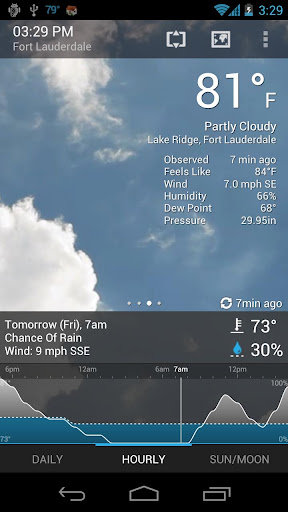
Overview: Weather Services PRO v1.7 Apk. Weather Services is a new weather app with clock, 4 widgets and graphic themes.
 Get the latest current conditions, forecasts, weather chart, maps, webcams and more with largest network of professional weather stations all over the world...


 Features Weather Services PRO v1.7 Apk
 ========
 - Live, local weather conditions and forecasts
 - Access up to tens of thousands of locations around world
 - 4 desktop widgets (Weather&Clock 4x2, Forecast 4x1, Clock 4x1, Mini 1x1)
 - Notification bar temperature icon, on slide-down all important weather details with quicka access to app
 - Up to 10 active locations
 - Great customization possibilities
 - One of the best battery consumption application on the Market
 - Webcams, charts & weather maps (satellite, HD available)
 - THEMES - customize your app by one click !
 - Fully customizable (font types, backgrounds, colors and others)
 - Easy use and high-impact visual eye candy views
 - Cached weather data for offline viewing
 - Quick access to your default clock and calendar applications
 - Android 1.6+, QVGA, WQVGA400/432, HVGA, WVGA800/854 compatible

 What's in this version:
 v1.7 Weather Services PRO v1.7 Apk
 Added: Weather alerts !
 Added: Cloudiness (hourly and detailed forecast) charts
 Fixed: Few small UI design bugs and corrections
 Added: New welcome screen with WEATHER PROVIDERS selection
 Fixed: Bug with wrong temperature (actual and forecasted) for some locations with YR.no weather data provider


Download : Weather Services PRO v1.7 Apk

Beautiful Widgets v4.11.3 Apk


Requirements: Android 2.0.1+
Overview: Beautiful Widgets v4.11.3 Apk. Beautiful set of widgets including clock+weather, with some toggles

 Beautiful set of Widgets containing clock widget, clock and weather widget, weather widgets, date widgets and toggle widgets with skins/themes support!

 Selected by Google as an Android Editor's choice and first paid application to reach 1 million of downloads! What a success driven by its community!

 See why it is the best Android clock and weather widgets and the only choice for thousands of users! You probably heard of Beautiful Widgets before!

 Android Central: "We love Beautiful Widgets"

 Android and Me: "Beautiful Widgets is one of the essential must-have Android apps, and has been for quite some time now. If you still haven t managed to buy the app, there s no time to waste."

 ZDNet: "The strength of Android is the ability to make the interface very personal, and Beautiful Widgets is the daddy of them all."

 Now with Honeycomb tablets support (ie the Motorola Xoom, Galaxy Tab)!

 - High Definition Super Clock HD widgets available in many sizes and many layouts. High quality rendering and resizable with no loss of quality!

 - Display either the weather, battery icon (both with skins) or just a clock on the widget.
 - 5 days Weather Forecast based on Google weather or Accuweather, with Geolocation support, automatic sunset/sunrise, also available on a weather only widget.
 - Weather alerts (USA only), storm/rain/snow forecasts
 - More than 15 nice Weather Animations (rain, storm, etc) for your pleasure when tapping the weather icon from the widgets.

 - Moon phases, actual and a calendar for the next 4/5 phases
 - Nice toggle widgets for Wifi, Bluetooth, Mobile, Brightness, GPS (shortcut), Silent, Vibrate, Plane Mode, 4G (only for a few HTC devices), Rotate, Pattern (below android 2.2) and a Timed Silence!
 - More than 1000+ FREE Skins/Themes to changes the look and feel of you clock, weather icons or toggle buttons ! Impress your friends with your clock widget!

 - Weather Live Wallpaper OpenGL accelerated (for supported devices only) which allow to display the weather live from your wallpaper, with many effects, physics and interactions!
 - Auto-refresh weather on widgets when your phone is unlocked
 - Define applications to launch when tapping the hours, date or forecast details from the widgets so you can access the most important applications very easy from our beautiful widgets.

 - Introducing Beautiful Today widget which display the date using the same look as the Super Clock
 - Temperature displayed in your notification bar, with access to the weather forecast. Now with the Ice Cream Sandwich look & feel if you are on Android 4.0!
 - Many options in order to create your own experience!

 Details:
 - Super Clock widget with weather, battery or just the clock 4x3 4x2 4x1 2x1
 - Weather only widget 4x1 1x1
 - Battery widget 1x1
 - Date widget 2x1 1x1
 - Text Clock simple widget 2x1
 - Toggles widgets 1x1
 - Home widgets with clock and weather and 300 skins 4x1 2x1

 What's in this version:
 4.11.3 Beautiful Widgets v4.11.3 Apk - 3rd August 2012
 - Fix a bug on skins list for version before gingerbread

 4.11.2 Beautiful Widgets v4.11.3 Apk - 2nd August 2012
 - New translations
 - Fix some bugs

 4.11.1 - 26th July 2012
 - Fix bug on bad skin folder


Download : Beautiful Widgets v4.11.3 Apk

Advanced Task Manager Pro v2.0.8 build 68 Apk


Requirements: Android v2.1 and up
Overview: Advanced Task Manager Pro v2.0.8 build 68 Apk. Kill tasks,free memory,speed up phone,save battery.
 ATM 2.0 with totally new UI is comming, and it's really cool!!!

 Kill tasks,free memory,speed up phone,save battery.
 ATM 2.0 with totally new UI is comming, and it's really cool!!!

 #Feature Advanced Task Manager Pro v2.0.8 build 68 Apk
 *Task killer, kill selected tasks
 *Ignore apps when kill tasks
 *Auto kill tasks on every screen off
 *Regular kill
 *Startup Kill
 *One click task kill widget
 *Quick uninstaller
 *Show battery life
 *Support android 1.5/1.6/2.2/2.3/3.x/4.0
 *Ad Free

 #Description
 Advanced Task Manager (ATMGR or ATM) is basicly a task killer. It can list all the running tasks, and you can select some of them to kill. It is also a task manager tool to manage all the apps or running apps, you can long click on the task that you want to kill, and you will get a poped up menu with more options.

 You may found that some apps are restarted again and again after killing, for some tasks are restarted by system events automatically. And we suggest that you enable Auto Kill in settings. Then it will kill tasks on every screen off. It will help to save battery and extend the battery life by terminating some apps that drawns too much battery.

 There are many task killer apps in the google market. What is the difference between our app with other task killers? Basically our app killer list more apps then others, because the way we use to get system running task list is same as the android system panel. Another important difference is that we have an uninstaller feature in our task killer, and you can uninstall useless apps. Most of the task killers have one click widget, but our widget can show available memory. It's not default enabled, users should enable it in settings. Overall our app killer is the best one of so many task or app kill tools in the market.

 Android >= 2.2 system changed the task manager machenism, and task killer cannot kill services and notifications when kill apps. If you want to kill tasks thoroughly, long click on the task that you want to kill, and click force stop, you will see the application info system panel, then click the force stop button. For android system >=2.2, click menu->service, you will see the running service system panel, and you can stop running services here.

 Any problem, it's better to send feedback to us to get help then 1 star!

 #FAQ
 Q: Why do apps restart again after killing?
 A: Some apps are restarted by system events and task killer apps cannot prevent them from restarting because of the limitation of the system. It is suggested to enable auto kill in setting, and it will kill tasks on every screen off. It will help to save battery life and release memory for the phone.

 Q: How can I add app to ignore list?
 A: You can long click on the task that you want to ignore, then you will get a poped up context menu, click "Ignore". The ignored apps will not be listed in the task list, and will never be killed by task killer. You can manage the ignored apps in setting.

 Q: Is task killer meaningful for android?
 A: Android 2.2 improved the task manager machenism and it is said that the task killer is meaningless for android. In my view it's partly true, in android 2.2, task killer tools is not powerful as it was in android 1.5-2.1, but it still can help to release memory and extend battery life by enabling auto kill. Our app is not only a task killer, it also can help to manage the running tasks and installed apps.

 Q: How can I manage startup apps by app killer?
 Our app killer has "Startup Kill", it can help you to kill apps on system startup.

 #KW
 task killer,taskiller,appkiller,taskkiller,task kill,task manager,task panel,taskpanel,app killer,app killer,app kill,app uninstaller,app remover,save battery,battery saver,free memory,free up memory,free up ram,ATK,ATM,ATMGR,startup kill,app closer,qq

 What's in this version:
 -v2.0.8
 #Exit on kill
 #Add some transltions


Download: Advanced Task Manager Pro v2.0.8 build 68 Apk

BeWeather & Widgets Pro v1.2.21 Apk


Requirements: Android 2.1+
Overview: BeWeather & Widgets Pro v1.2.21 Apk. The only weather and widgets app you will ever need!


 See the current weather in stunning high definition weather animations! Contains many beautiful and highly customizable weather and clock widgets.
  •  "The Year's Top 10 Apps for Android Phones" The New York Times 2011
  •  "BeWeather is a drop dead gorgeous weather app that gets its data from Weather Underground." Gizmodo 2011
  •  "BeWeather is now our go-to weather app. Period." Android Central 2011

 NEW! Use clock skins and iconsets from the popular Beautiful Widgets app!

 The #1 best selling and award winning BerryWeather for BlackBerry is now finally coming to Android!

 BeWeather Pro brings a ton of customization options to modify its looks, widgets, notification settings and default weather parameters. Set custom background images or stick with the eye-candy high definition animations portraying current weather conditions.

 BeWeather Pro will download an additional 25 MB of resources after installation (saved in external/sd memory).  BeWeather 1.2 with support for ICS will be released very soon. Want to help beta test? http://forum.xda-developers.com/show....php?t=1211903

 FEATURES BeWeather & Widgets Pro v1.2.21 Apk:
 - 100% Ad-Free
 - Weather data provided by Weather Underground, includes 7 day and hourly forecasts
 - Visually stunning display of weather information using high definition animations
 - Fully customizable clock and weather widgets in multiple sizes. Comes with 150+ FREE iconsets!
 - Support for skins and iconsets from the popular Beautiful Widgets  app!
 - Support for iconsets from the popular Fancy Widgets  app!
 - More accurate conditions by switching to a nearby weather stations for any location
 - Dynamic Google Maps based animated radar and satellite maps (US only)
 - Automatically track your location via GPS/cell
 - Temperature notification in statusbar
 - Automatically refresh weather on widgets at preset interval or when your phone is unlocked
 - Instant weather advisory notifications (US only) via push technology (Android 2.2 and higher)
 - Built-in animated radar maps (US only)
 - Replace/extend the default radar maps with your preferred weather service's radar maps!
 - Get more accurate conditions by switching to a nearby weather stations for any location
 - Add custom web cams and other media links (weather radio, video, HTML etc)
 - Sunrise/Sunset times and moon phase
 - Completely customize BeWeather using fonts and colors

 Beautiful Widgets is a trademark of LevelUp Studio and is in no way affiliated with Bellshare
 Fancy Widgets is a trademark of Android Does and is in no way affiliated with Bellshare

 What's in this version:
 - Added "my location" indicator on nearby stations and radar maps
 - Fixed weather alert push notifications not working reliably on some devices
 - Improved support for Jelly Bean


Download : BeWeather & Widgets Pro v1.2.21 Apk

Related Posts Plugin for WordPress, Blogger...